 ViewGraph
Everything here reflects the current implementation, not an aspirational design. Where a path is only exercised by tests with fakes — or isn't verified at all — I've said so plainly at the end.
Finding authored previews
It starts with the project scan. ViewGraph discovers the Swift files
and Xcode project metadata, then parses each file with
swift-syntax. Two kinds of authored previews come out
of that pass:
-
Modern
#Previewmacros. Each macro becomes one descriptor, with its display name, source file and line, and — when it can be resolved — the body source that will be rendered. -
Legacy
PreviewProvidertypes. A provider can declare several variants. Where it's safe to do so, ViewGraph splits it into one descriptor per variant, so a static and a dark preview show up as two separate entries instead of one opaque provider.
There's a third source called a usage preview: when a view has no authored preview but is used somewhere in the project, the tool can synthesize one from that usage. Descriptors record their origin — declared, legacy or usage — so the graph can be honest about where an image came from.
Each descriptor is marked supported or not. An unsupported preview carries a reason, such as a body too complex to reproduce safely as a standalone adapter. Unsupported previews aren't dropped silently; they stay in the model with their reason attached.
Attaching a preview to a view
A preview is only useful on the canvas if it belongs to something. The analyzer tries to resolve the preview's body to a known graph node, and stores that node's identifier on the descriptor. When it resolves, the image shows up on the screen or component card. When it doesn't, the descriptor still exists, but it isn't attached to a node — and the card shows no preview rather than borrowing an unrelated one.
Previews are kept alongside the graph snapshot rather than on the nodes themselves, so attaching or replacing a preview never forces the graph layout to be recomputed. That separation is what makes preview hydration feel independent of analysis.
Preparing a host without touching your project
To render a preview, ViewGraph needs to build and run it. It does that against a mirror of your project — a copy under Application Support. Your real repository is never opened for writing, and the mirror is what gets mutated.
The host generation has a few constraints worth knowing about:
-
The host goes in the preview's own file. A generated
@mainentry point is injected into the same source file as the selected#Preview, soprivateandfileprivatehelpers declared beside it stay in scope. -
Your app's entry point is disabled, not deleted.
The mirror strips
@mainfrom the original declaration. Every declaration stays; only the entry attribute is removed, so the app still compiles as a library for the host. -
It's gated by a compilation condition. The
generated code lives inside
#if VIEWGRAPH_PREVIEW_HOST, so it can never leak into your normal build. -
Re-injection is idempotent. Any previously
injected host block is removed before a new one is added, so
repeated renders can't accumulate duplicate
@maindeclarations. - The preview body is resolved once. A small wrapper captures the authored body's value in its initializer instead of re-running it every time SwiftUI evaluates the view. Re-running an expensive body — a SwiftData container, for example — can create a render feedback loop that never settles.
The generator also resolves which application target to build, detaching embedded app extensions and watch apps from the host build. A host overrides the bundle identifier and builds for one destination, so leaving an extension attached would fail install with a bundle-ID mismatch.
Building and launching
Building a project is expensive, so the goal is one build, one
launch, many captures. Before committing to a toolchain path,
ViewGraph probes the environment: it typechecks a tiny
#Preview adapter against the selected SDK, target and
destination, and memoizes the result per environment key. If the
toolchain can't compile a trivial preview, the batch doesn't start.
When the environment supports it, a batch host is prepared once per revision and reused across captures. The intended lifecycle is one build manager and one running process that the renderer talks to over small command and status files: the renderer writes a command, waits for a ready or failed status, and reads the resulting image. A batch session can be ended explicitly, or all sessions can be torn down.
Two revisions can coexist — the "before" and "after" sides of a commit comparison each get their own host — which is why the pool is keyed by revision rather than globally.
Switching, rendering and capturing
Capture depends on what kind of node the preview belongs to, and there's a deliberate split:
- Device capture for screens and widgets: the app is installed and launched in a booted iOS Simulator, and after a short settling delay the renderer takes a screenshot and validates the PNG.
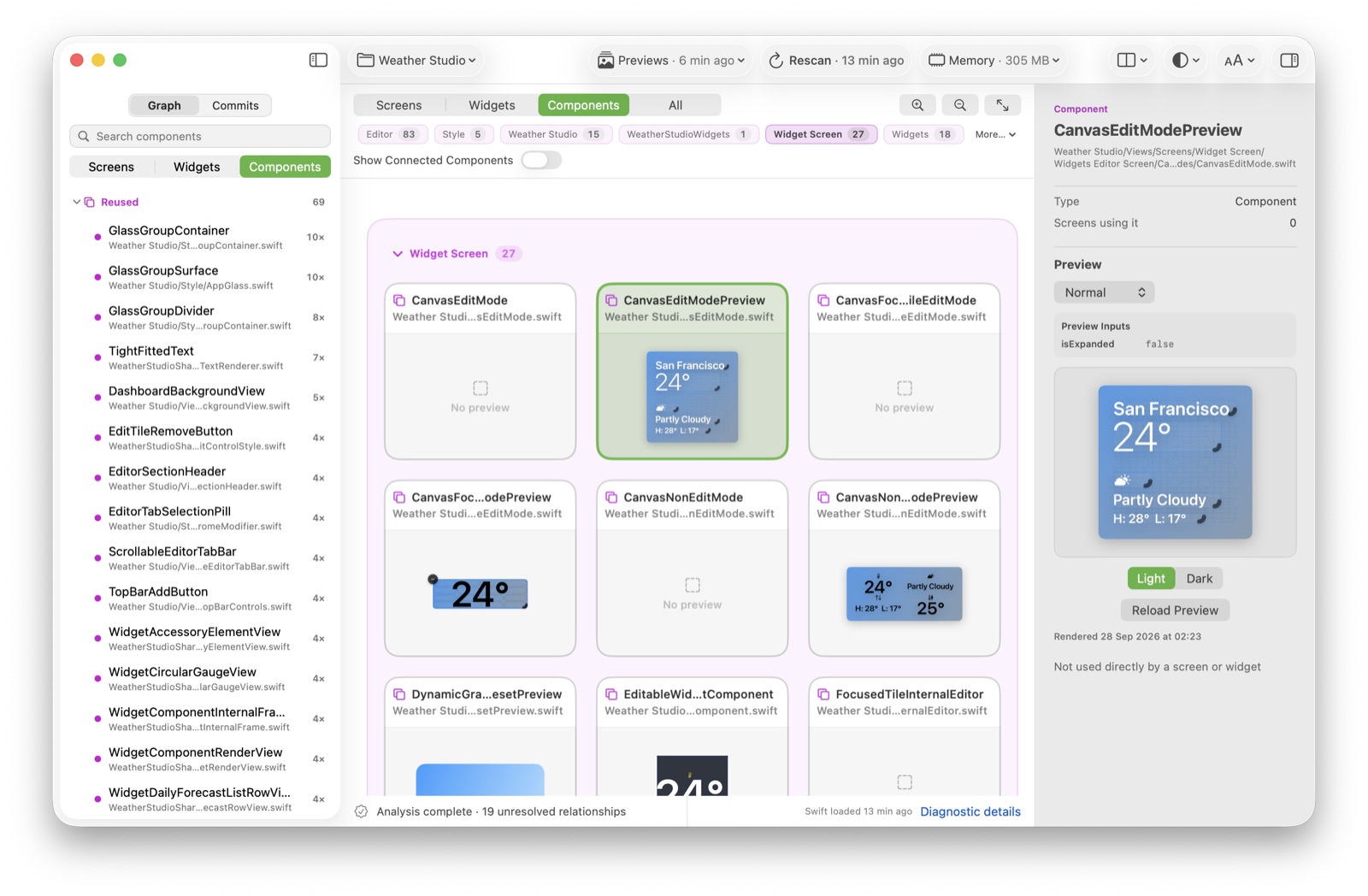
- Content-fit capture for components: instead of screenshotting a device, the host renders the component offscreen and writes a fitted PNG — no status bar, no device chrome, no phone canvas — to the app's Documents directory, which the renderer polls for.
Both paths check that the preview process is actually alive, and both clean up by terminating and uninstalling the host and removing the transient build root — on success and on error. If the host crashes, the renderer looks for the newest simulator crash report and retries a small number of times before giving up.
Caching and hydration
Previews are cached at two different levels, and it's worth keeping them straight:
- The renderer artifact cache. Stores the full PNG under a key made of the project, preview identity, content digests, configuration, toolchain, simulator, appearance and capture mode. The interesting part is the digests: they're what decide whether a cached image is still valid after a source change. Corrupt artifacts are quarantined rather than shown.
- The persisted preview cache. Stores the image next to a revision key, with working-tree and per-commit entries kept separate. This is what lets a "before/after" comparison show revision-correct previews instead of whichever render happened last.
When you open a project, ViewGraph doesn't re-render everything. It hydrates what's already cached, in priority order: the selected node first, then visible nodes, then the active surface, then the rest. The decode work is batched off the main thread, so the UI stays responsive while images load. Preview identity is used for selection, but it is not the freshness authority — the content and project digests are.
Variants, fallbacks and states
A preview can have more than one variant — light and dark, or a legacy provider's multiple entries. Each variant is its own descriptor, so they're selected and cached independently. The alternative variants aren't eagerly rendered; they're served on demand from the same host.
Not every preview takes the batch path. Legacy
PreviewProvider types, unsupported descriptors, and cases
where the analyzer couldn't extract a renderable body all fall back to
the single-preview pipeline: build, launch, capture, terminate. A
failed batch isn't fatal; it degrades to a per-item build. A single
failing item in a batch falls back to a dedicated host rather than
failing the whole batch.
Finally, what you see on a card is a small state vocabulary, and the distinctions matter:
- No preview — no descriptor was authored or synthesized for that node.
- Not loaded — a descriptor exists (and may be cached) but no thumbnail has been hydrated into the canvas yet.
- Rendering — the preview is queued or building; the banner reports the stage.
- Failed — a render was attempted and errored; the descriptor stays available to retry.
- Unsupported — the descriptor is known to be unsupported, with the reason attached.
What is not verified
This is the part most tool posts skip, and I'd rather not. The
pipeline above is covered by unit tests that use fakes for the
process layer. What those tests do not exercise is a real
xcodebuild and simctl run — no committed
test builds an actual project end to end.
More specifically, batch host reuse is implemented in the architecture but, in the current runtime, the simulator host appears to relaunch for individual components instead of being reused. It's diagnosed through a summary line that reports builds, launches and host reuses. Until that's proven at runtime, I won't claim batch rendering is fully working, and the app surfaces the same uncertainty in its diagnostics.
One more boundary: without a working Xcode installation there is no preview pipeline. The app still analyzes source and shows the graph, bookmarks and Git history, but previews report that the toolchain is unavailable rather than pretending to render.
Watch it on your own project
ViewGraph 0.1.0-alpha.2 renders previews locally and caches them per revision. Preview coverage and missing previews are reported in the Overview.